Multiplayer requirements
Danger
These pages describe new requirements & functionality for which we are gathering developer feedback. Please share any concerns or comments through [email protected]. The SDK is subject to change. We will update as soon as possible with the confirmed version and a timeline for implementation.
Games that offer an online multiplayer experience have 2x higher long term retention than single player games. We are strongly supporting multiplayer games on CrazyGames. Our Play with Friends functionality is designed to enhance the social experience of players, offering many benefits that foster community, engagement, and enjoyment.
How it works
- Users must have a CG account and be logged in to use the Friends feature
- Users can send and receive friend requests
-
When a user is in a joinable location within a game, following functionalities are available:
-
Friends can join the user
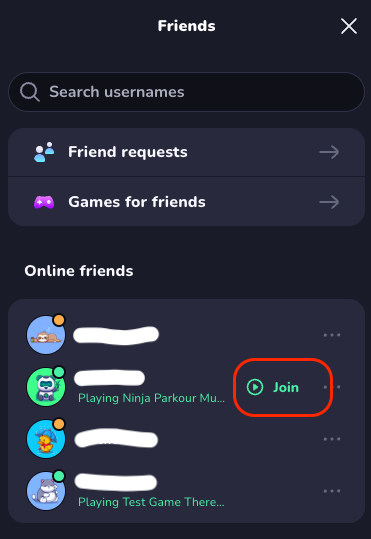
-
The user can invite their friends, who will get a notification if they’re online
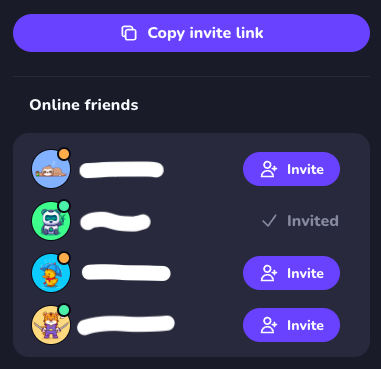
-
-
The Game module in our SDK offers the functionality to support this this
- Games that support Friends functionality are featured on the dedicated Multiplayer landing page
Requirements for Online with Friends
If your game includes an online multiplayer mode, the following requirements must be met to be eligible for our Multiplayer landing page.
Implement multiplayer flows
A smooth experience to bring and keep friends playing together is crucial for a succesful multiplayer game. Your game should implement these features:
- Sharing the user's room & status: Pass information on the user's room in your game through the CrazyGames SDK so we can activate our Join/Invite functionality. This will allow users to join easily via the CrazyGames UI. Avoid onboarding scenes for players joining like this, or make them skippable.
- (New) Use the Update Room functionality to indicate in which
room(unique within your game at any time) a user is playing, and whether or not the room is open for other players to join (isJoinable). Use theinviteParamsto pass information from the inviting players to their friends. Note: for existing games, the Invite Button remains supported.
- (New) Use the Update Room functionality to indicate in which
- If you also want to allow copying direct invite links within your game, integrate the Invite Link functionality.
-
Instant Multiplayer: The first player in a party should be placed directly into a new private room with default settings.
- When the IsInstantMultiplayer flag is set to
truein the SDK, the game should launch directly into multiplayer mode when triggered from the CrazyGames UI. This happens for example on the Multiplayer landing page. - An intermediate configuration screen (e.g., game mode, player count) is acceptable.
- For games that support 20+ players, you may instead place the player directly into public gameplay.
- In all cases, the user should be joinable immediately after launching the game so their friends can join.
- When the IsInstantMultiplayer flag is set to
-
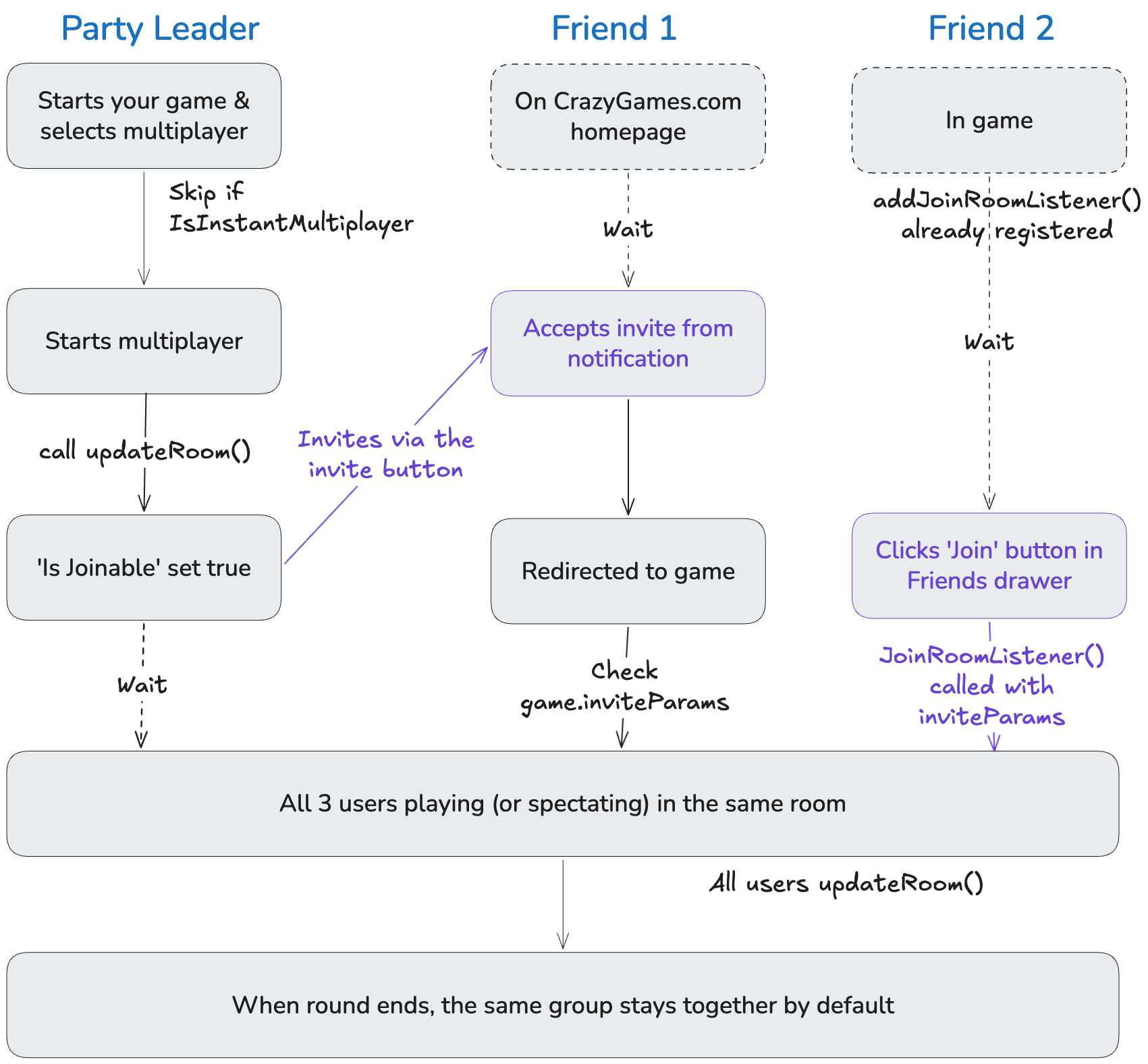
Round-based games: At the end of a match, players should be able to continue playing with the same group without having to navigate back through the CrazyGames UI. Either by starting the next match immediately in the same room, or by directing all users to the same new room.
Refer to the visual below which covers each of these cases:
Additional multiplayer requirements
- Lobby Size: Submit lobby sizes when uploading your game build (For changes to existing games please contact our team).
- CrazyGames usernames: must be displayed in-game so players can recognize their friends. Read more on our User module page.
- If you want to implement chat functionality, check the specific requirement below.
Guidelines for Online with Friends
Guideline
The following guidelines are strongly recommended for a good experience in playing with friends:
- Preferably players can join an existing room at all times, and while a round is on-going go in spectator mode. Alternatively your game should show a popup that the room is not available.
- Often users are already loading the game they want to play before joining/inviting each other. Implement our Room join listener to ensure a smoother UX without a page reload.
- Our User module offers a method to get the list of CrazyGames friends for the user. You can use this info within your game for various UX improvements (joining, notifying, matchmaking, ... )
Multiplayer games in Basic Launch
Multiplayer games that require a large audience to ensure a good gaming experience may skip Basic Launch and proceed to Full Launch immediately. In that scenario your game is required to comply to the Full Launch integration requirements.
For multiplayer games that have a single player component and that do not require a large testing audience, a Basic Launch step is required.
Our QA team will decide which flow applies for your multiplayer games, and optionally provide feedback to you.
Chat and User Generated Content (UGC)
Basic ImplementationFull Implementation
Chat is a powerful tool for engagement, but carries risks. If you decide to implement chat functionality:
- Your game should disable your chat based on the game settings. In case of complaints, we will require you to disable chat alltogether.
- We require you to add chat moderation. The simplest solution is a profanity filter. Refer to this sheet for a non-comprehensive list of words to block.
- A more advanced solution is AI based moderation. We partner with Lasso Moderation and you are eligible for a referral bonus when integrating their solution. Read more on our Partners pages. This is not recommended for Basic Launch games.
Moderation is also required if your game involves User Generated Content like uploading custom images or drawings. The Lasso solution can cover those content types as well.